
Version 21.3 Release Notes
Announcing version 21.3 of your HRIS portal. Please review the release notes below for 21.3 updates and let us know if you have any questions or concerns.
New Welcome Message Configuration
Are you frequently changing the company welcome message in your portal with new information for employees? Updating these messages is now easier than ever.
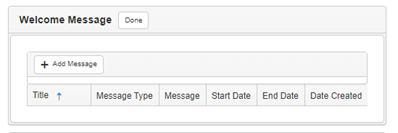
With our new welcome message configuration, you can add new messages directly from your home page just by clicking the new Manage button on your Welcome Message widget.

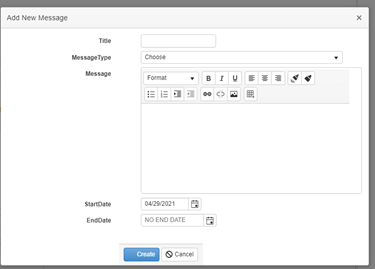
We’ve also added the ability to schedule your messages so you can get your employees the information they need--when they need it. To start scheduling, just add a Start Date and End Date in the Add New Message dialogue box.
Google Authenticator
Two Factor Authentication (2FA) protects you by adding a second layer of defense to your HRIS portal. While passwords alone grant access by asking for “something you know,” 2FA takes this a step further by also requiring “something you have” to grant access.
This means that even if a bad actor has acquired your password, they will not be able to access your account unless they physically have your phone in their hand.
To help protect your sensitive data, we have integrated Google Authenticator into the application as another method for two factor authentication.
Enhanced Employee Accrual Configuration
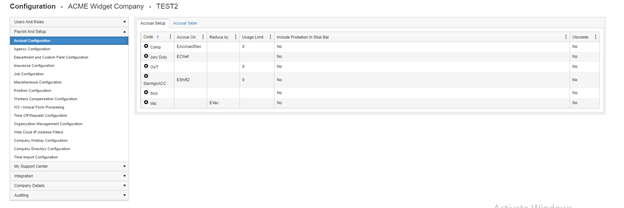
With this release, we’ve also expanded our employee accrual configuration and added this to the New Employee screen. When adding an employee, now you can simply check the boxes of any accrual codes you’d like to apply to your new hire.

Note: These accruals are based on your company’s accrual configuration. You can view your company accrual configuration anytime by launching the HRIS Administration module and selecting Payroll and Setup > Accrual Configuration from the side menu.
Check Types Drop-Down Added
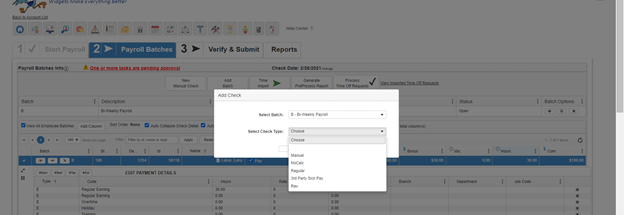
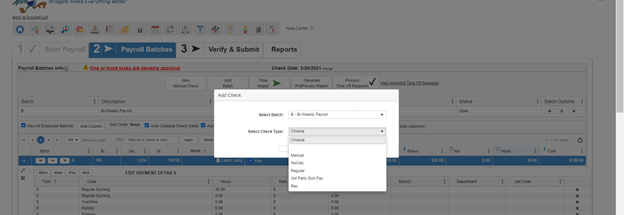
In this release, we’ve also added the ability to select check type when adding a check in your payroll grid. Simply click the simply click the + button next to the employee’s name to add a new check. Then, choose your check type from the Select Check Type drop-down menu to take advantage of this new feature.
In Case You Missed It
New Custom Fields
In our 21.1 update, we added the ability to create custom fields in the Employee Management section of your portal. These fields are completely customizable to fit your company’s needs.
If you haven’t already tried them out, custom fields can be set up in your HRIS Administration module > Payroll and Setup > Department and Custom Field Configuration > Custom Fields. Learn more
PPP Forgiveness Estimator
Our team is continuing to monitor PPP guidance and update our forgiveness module as new information is released. Whether you’re applying for a Round 2 loan or are preparing to submit your forgiveness application for a Round 1 loan, our PPP Forgiveness Estimator module has a wealth of information to guide you through the loan forgiveness process.
The current version of the estimator incorporates the most recent guidance and uses the generally accepted assumptions about the areas of the code that guidance has not yet been released on. For more information on the PPP Forgiveness Estimator, check out:
Comments
0 comments
Please sign in to leave a comment.